-
1
A tip from cash change
In Cash type the amount the customer gave you, then press Tip. Enter the tip, or press Keep the change as a tip. Then press the Take cash button. A tip cannot be more than the change.
1: the tip amount. 2: keep all the change. 3: the take button. Careful: This tip stays in the drawer until the close. Do not move it to the tip jar or declare it again. -
2
A tip with a card
In Card enter the amount under Add tip before you record the payment or send it to the terminal. -
3
The tip jar at closing
If you keep a tip jar apart from the drawer, enter each employee's amount under Cash tips on the close screen. You can add another employee from the list. This money is not part of the expected drawer cash.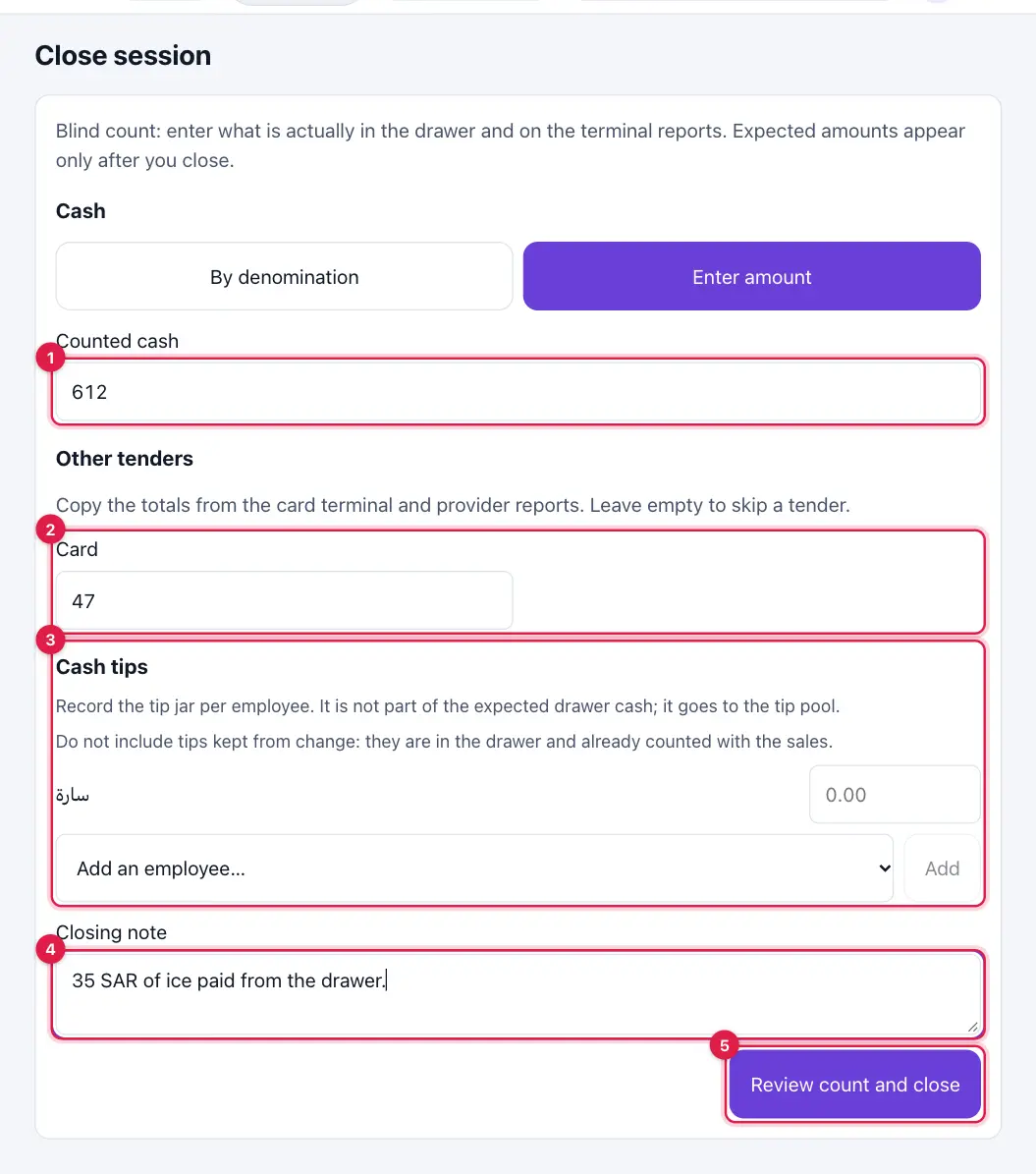
Mark 3 in the image: the cash tips section. -
4
Review and correct tips
Tips appear on the Z-report and in End of day. A declared tip cannot be lowered at the till. An owner or manager corrects it under Operations → Sessions: open the shift and press Correct beside the employee. A correction can only lower the amount and needs a reason.Good to know: To turn tips off on the till: Settings → Business → Cash tips.
Did this guide help?