Good to know: Owners, managers and accountants do this in the back office.
-
1
Try a normal close first
If the till works, close the shift on it with a count. A forced close has no cash count, so no variance is recorded. -
2
Open End of day
In the back office choose Operations → End of day, then the branch and business day. The table shows each register's shifts and their state. Look in the Day state column for Past the cutoff or Blocked — close it.
1: the <b>Force close</b> button on the shift's row. Tip: You also find an older shift under Operations → Sessions: open it and press Force close. -
3
Confirm the close
Press Force close on the shift's row, write why under Note (why), then press Force close in the window. The Z-report is built from what the server holds. Careful: The button shows for every open shift, even a healthy one, so check the register before you confirm. Receipts that reach the server later are kept, not lost.
-
4
From a till: the Manager screen
A manager or supervisor can close from another till: Manager → End of day. Force close shows only for a stale shift on another register, and it needs a Manager PIN and internet.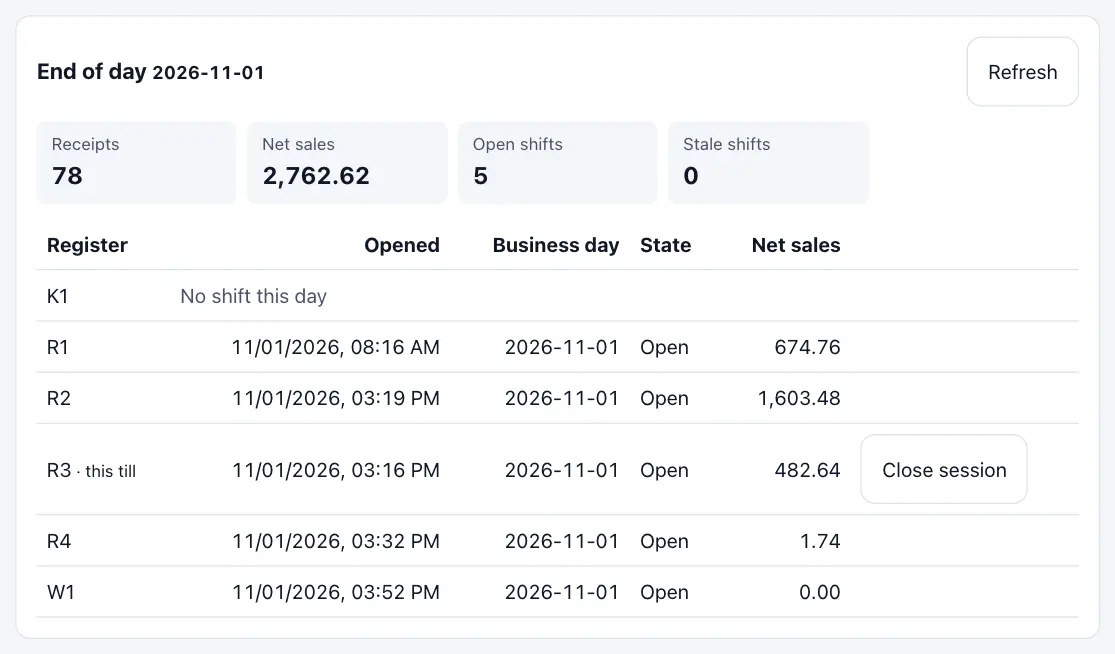
-
5
Record the count later
Count the drawer as soon as you can. Then open the shift under Sessions and press Record / correct count. It is saved as a count after a forced close, within 30 days. The affected till shows a message asking for a new shift.
Did this guide help?