The link to your Salla or Zid store is built, but it is in beta: it is waiting for the Basmtak app to be approved by Salla and Zid, and it has not been run on a real store yet. If you see This platform is not set up on the server yet, the approval is not complete and there is nothing for you to do yet.
Before you start
- Salla's or Zid's approval of the Basmtak app. Our team handles this.
- An active store, and its owner's approval when linking.
- The owner's account in Basmtak Cashier. A manager cannot connect or disconnect.
- A plan that includes online stores. See the pricing page.
-
1
Start connecting
Open Delivery → Online stores and press Connect a store. Choose the platform, then the Stock branch: the branch whose stock the store shows and where its orders arrive. You can choose a Price list or keep Item prices.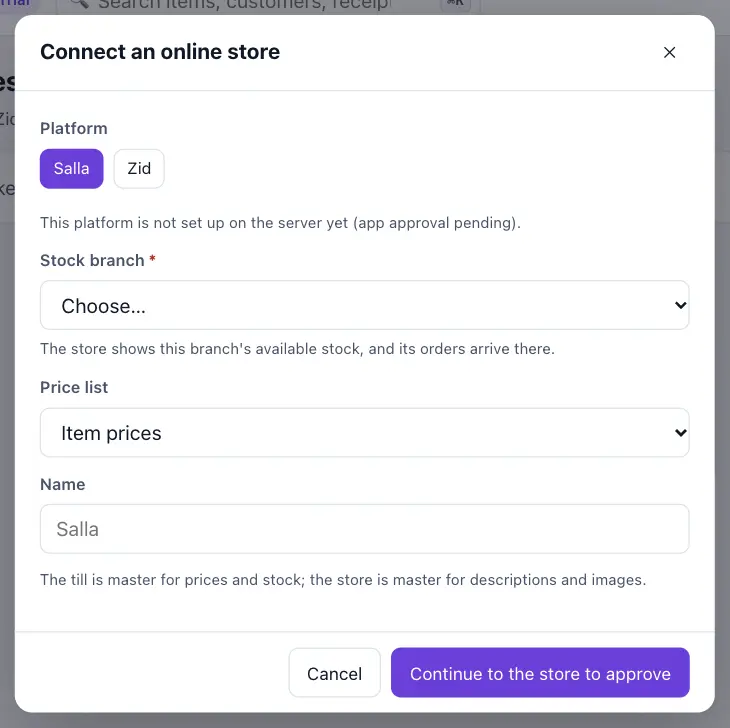
-
2
Approve from the store
Press Continue to the store to approve, then approve on the Salla or Zid page. Finish in the same browser you started from. You return to the back office with the store Connected. -
3
Link the products
Open the store. Press Import products if your catalogue is in the store, or Match products if your items are already at the till. Then review the Product links tab and pick a variant for each product that is Not linked. -
4
Follow orders and syncing
Orders reach Incoming orders at the till. If one is missed, press Sync orders. The Sync log shows each run and its result.
What moves between the systems
| What | Direction | Details |
|---|---|---|
| Products | To Cashier | Imported from the store when you press <b>Import products</b>. |
| Descriptions and images | To Cashier | The store is the master for these. |
| Prices | From Cashier | The till is the master. They are sent automatically after each change. |
| Stock | From Cashier | The available quantity in the <b>Stock branch</b>, sent automatically. |
| Orders | To Cashier | They reach <b>Incoming orders</b> in the stock branch. |
| Order status | From Cashier | It goes back to the store. |
FAQs
The price differs between the store and the till. Which one stays?
The till's price: it is the master for prices and stock.
What happens when I disconnect the store?
Syncing stops and access is removed, and product links are kept if you reconnect later. The owner can disconnect even if the plan has ended.
A warning says the store's notifications could not be registered. What do I do?
Orders will not arrive on their own. Use Sync orders or reconnect.
Can I link more than one store?
Yes, each with its own stock branch. One store cannot be linked to two accounts.