Link Basmtak Cashier to your Basmtak Books account and one journal arrives for each closed shift in each branch, together with stock moves, supplier bills and card settlements. Single sales receipts do not go to the books: the shift's summary does. You make the link yourself with a key you issue in Basmtak Books. Our team does not need to do anything.
Before you start
- A Basmtak Books account on a plan that includes API keys. If you do not see them, check the Basmtak Books pricing page.
- Permission to issue a key in Basmtak Books.
- An owner or a manager in Basmtak Cashier. An accountant can see the screen but not change it.
-
1
Issue a key in Basmtak Books
Open Businesses & people → API keys and press New key. Make sure you are in the right business: a key works on one business only. Turn on these permissions:- Journals — post
- Stock moves — record
- Supplier bills — write
- Card settlements — post
- Chart of accounts — read
Careful: The key is shown once only. If you lose it, rotate it from the same list and paste the new one into Basmtak Cashier. -
2
Paste the key into Basmtak Cashier
In the back office open Compliance → Integrations and choose Basmtak Books from the list. Paste the key into API key and press Save.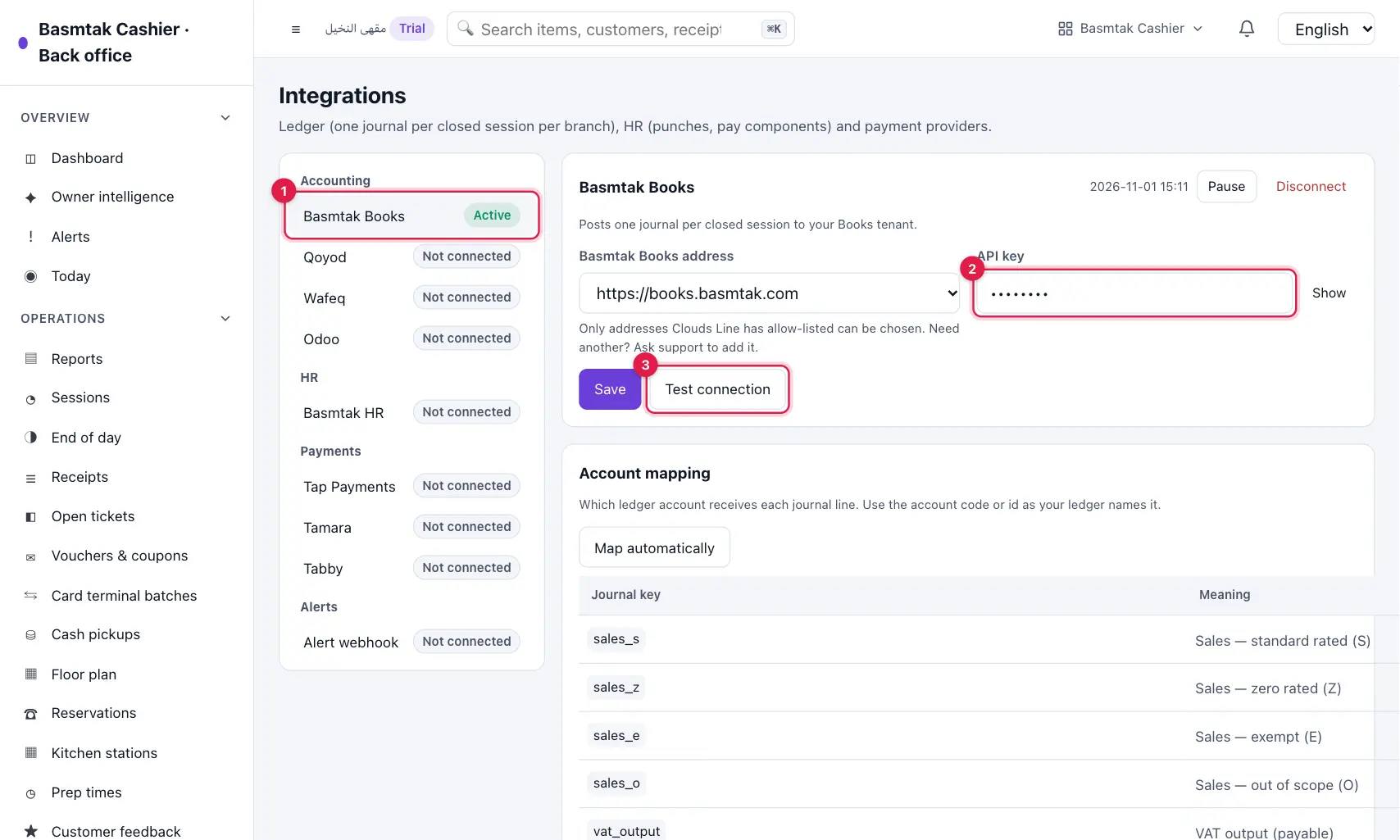
-
3
Test the connection and check the business name
Press Test connection. Connected appears, and next to it Posts into with the business name and VAT number. If you see another business, issue the key from the right one. -
4
Map the accounts
Under Account mapping, each row sets which account in your chart receives that kind of amount. On the first link the system reads your chart and suggests the accounts by itself. You can run it again with Map automatically. Review what appears, fill in the empty rows, then press Save. Nothing is kept before you press it. Careful: If a warning says some accounts are not mapped, journals will fail until you map them.
-
5
See what arrives and how
A shift's journal arrives posted right after the shift closes. Journals for waste, stock count differences and opening stock arrive as drafts, so your accountant can write the reasons and post them from the journals list in Basmtak Books. -
6
Follow what was sent and retry what failed
Open Compliance → Outbox to see everything that was sent. If something does not arrive, the system tries again after 1 minute, then 5, 15, 60 and 360 minutes. After that its status becomes Dead: fix the cause and press Retry. A retry never duplicates the journal. For one shift, open Operations → Sessions, then the shift, where you will find Journal and Repost journal.
What moves between the systems
| What | Direction | Details |
|---|---|---|
| Sales, VAT and takings | From Cashier | One journal per closed shift per branch: sales by tax category, output VAT, payment methods, drawer over or short, and cost of goods. The branch travels as a cost centre on every line. |
| Sales outside a shift | From Cashier | Whatever is sold outside a shift is gathered into one daily journal for the branch. |
| Credit customers | From Cashier | Each credit customer gets a line under their name in the journal, so it shows on their statement in Basmtak Books. |
| Stock moves | From Cashier | After each shift, quantities and values reach the stock ledger in Basmtak Books, with no second cost journal. |
| Waste, counts and opening stock | From Cashier | A draft journal plus the stock moves, waiting for your accountant to post it. |
| Purchases | From Cashier | Goods receipts and purchase invoices arrive as supplier bills, with their payments, returns and voids. |
| Card settlements | From Cashier | A settlement file you import arrives as a settlement, with the bank's fees and their VAT. |
| Chart of accounts | To Cashier | Read only to suggest the mapping. Nothing changes in your books. |
FAQs
Does every sales receipt reach Basmtak Books?
No. One journal arrives for each closed shift in each branch. The receipts stay in Basmtak Cashier, which reports them to ZATCA.
We closed a shift and its journal is missing. What do I do?
Open Outbox and choose All statuses to see why. The usual causes are an unmapped account, a revoked key, or a plan without API keys.
Will a repost duplicate the journal?
No. Each journal has a fixed reference, so it is never created twice.
I have not mapped the waste and count accounts. Are those journals lost?
No. They go to the cost of goods account until you map them. Opening stock does need its own account mapped first.
Can I use Basmtak Books and another accounting system together?
No. One accounting system works at a time. If you turn on more than one, Basmtak Books takes priority.