مواد پر جائیں
UR
SA
14 دن مفت شروع کریںمفت شروع کریں
ہوم قیمتیں ریستوران ریٹیل ہارڈویئر کیشیئر پر منتقل ہوں مدد کا مرکز رابطہ
کاؤنٹر میں سب کچھ
بصمتك کی مصنوعات
مدد کا مرکز

How do I check an item's price without opening a ticket?

Price check shows the VAT-inclusive price and the stock, and works offline.

یہ رہنمائی عربی اور انگریزی میں لکھی گئی ہے۔ آپ انگریزی نسخہ پڑھ رہے ہیں۔

Selling at the till 2 منٹ 4 مراحل کیشیئر کے لیے
  1. 1

    Open Price check

    Press Price check in the till's top bar. This does not touch the open ticket.

    Open Price check
  2. 2

    Scan the item or type its name

    Scan the barcode, or type the name or code and press Find. The item appears with its price including VAT. Items sold by weight show the price per kilo.
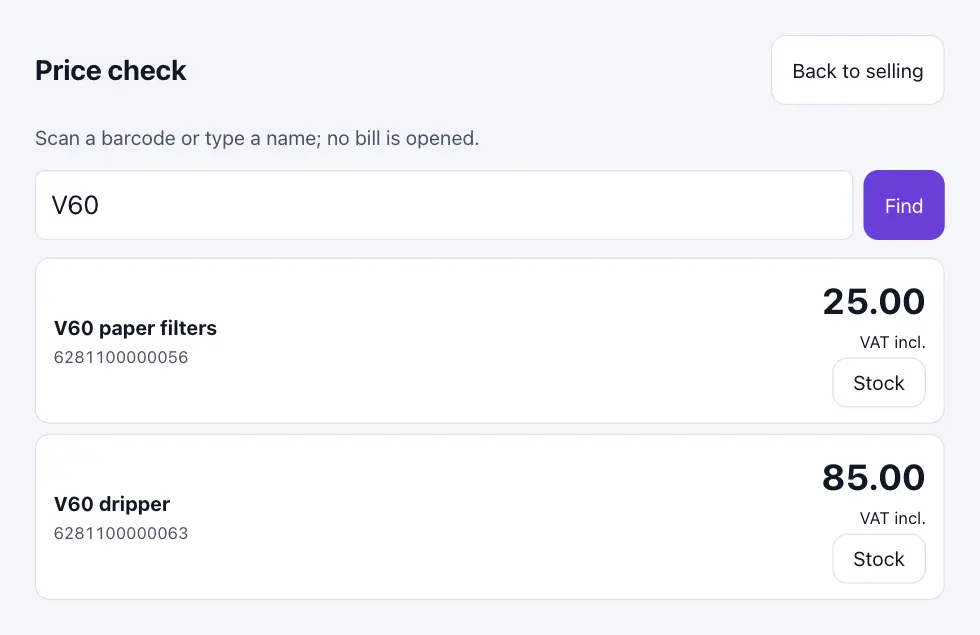
    Scan the item or type its name
  3. 3

    See the stock

    Press Stock next to the price to see the quantity at this branch and the others. If the item is not on sale you see Not available now.
  4. 4

    Go back to selling

    Press Back to selling. This screen creates no ticket and prints nothing.

مزید مدد چاہیے؟

ہماری سپورٹ ٹیم کو بتائیں کہ آپ کو کیا نظر آ رہا ہے۔