-
1
Name the ticket if you want
To recognise the ticket later, press More, then Call name, type the customer's name or the car, then Done. This is optional, and the name prints under the order number. -
2
Press Park
Press Park or F4. The ticket is saved at once with no questions and an empty ticket starts for the next customer. The count on the Parked button goes up.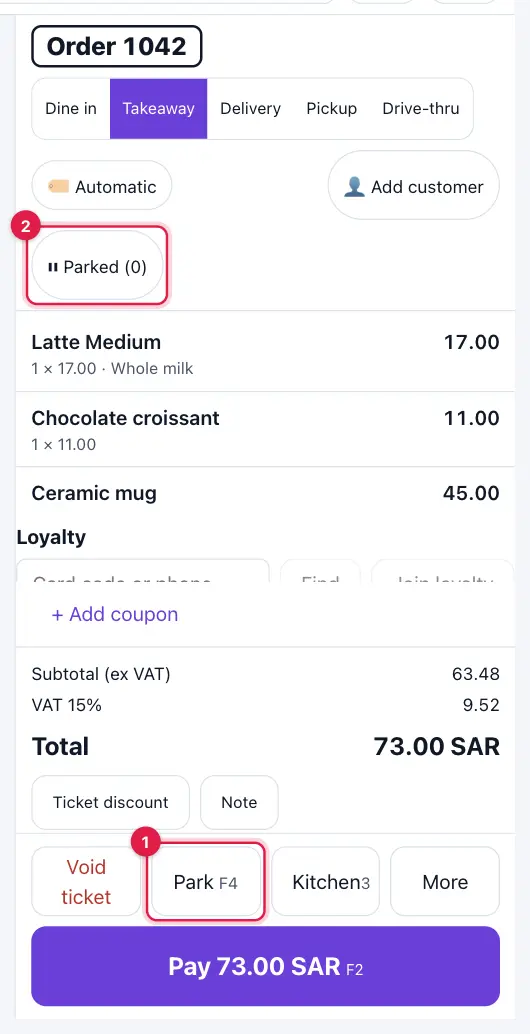
1 Park the ticket. 2 The list of parked tickets. -
3
Bring it back
Press Parked at the top of the ticket, then Recall next to the one you want. It comes back as you left it. If the ticket in front of you has items, it is parked automatically so nothing is lost.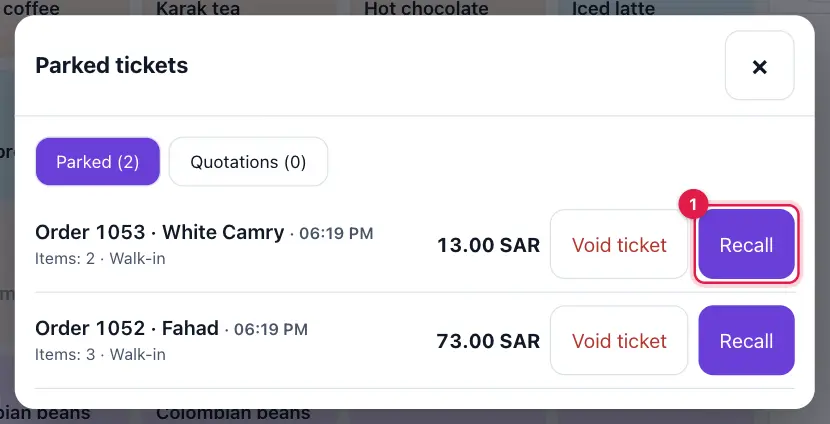
1 <b>Recall</b> puts the ticket back on the screen. -
4
Void or merge a parked ticket
If the customer does not come back, press Void ticket next to it in the list and pick a reason. To join two tickets, open the first, then More → Merge a parked order, then Merge here next to the other ticket.जानने योग्य: A parked ticket is not a receipt. Nothing leaves stock and nothing is reported until it is paid. It carries over when the shift closes, unless it holds a payment. Finish that one first.
क्या इस गाइड से मदद मिली?