-
1
Open the sign-up page
On cashier.basmtak.com, open the sign-up page. Sign-up happens on the website only, not in the phone or iPad app. -
2
Fill in your business details
Enter Business name, Your name, E-mail and Mobile number, a Saudi mobile starting with 05. Then choose a password of at least 8 characters. VAT number (optional) can wait until later. Then click Create my account.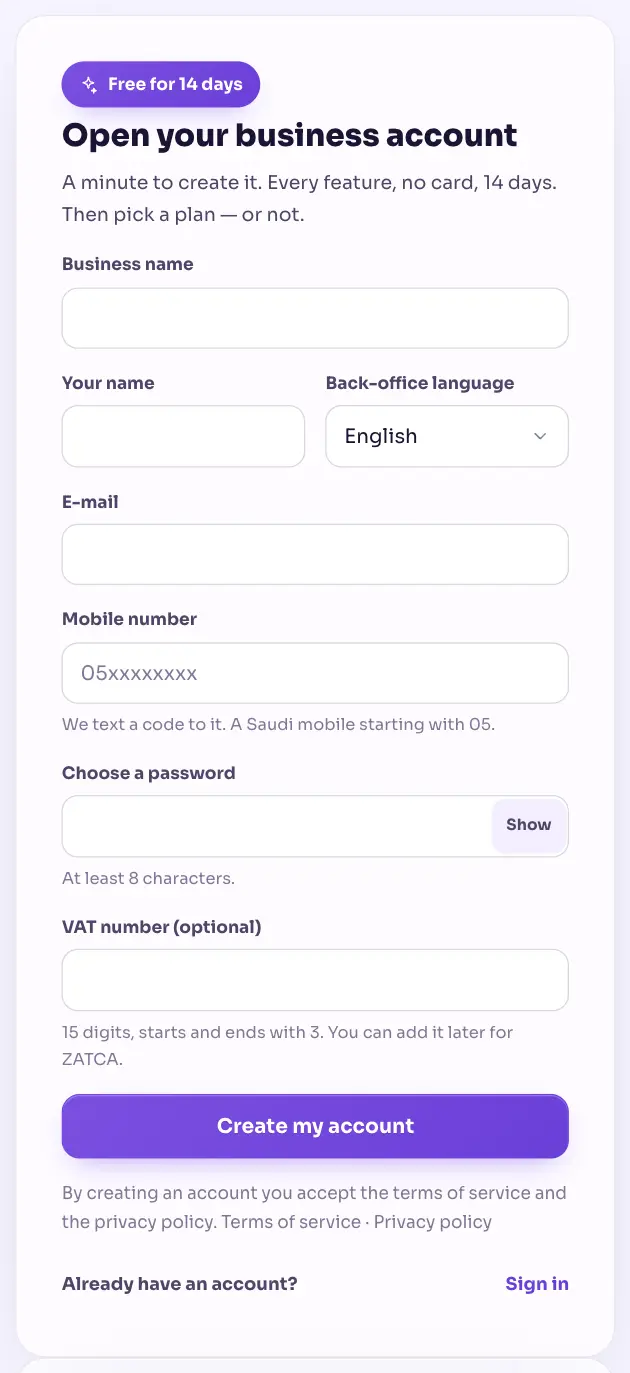
The sign-up form on the website. -
3
Confirm your e-mail and mobile
A 6-digit code arrives by e-mail, and another by text message to your mobile. Type them into E-mail code and Mobile code, then click Verify and open my account. The codes are valid for 30 minutes. পরামর্শ: No code? Check your spam folder, then click Send new codes. If the e-mail or mobile was wrong, click Wrong details? Start again.
-
4
Start the shop setup
Your account opens straight on Shop setup, a short six-step wizard. One main branch and one register called R1 are already created. A register is a till position that a device is paired to. -
5
See when the trial ends
The trial lasts 14 days and includes every feature. You will find the end date under Settings → Subscription & billing, in Trial ends. Choose a plan when you are ready; see the pricing page for prices.
এই গাইড কি সাহায্য করেছে?