-
1
Two screens for two jobs
The back office is for setup and follow-up. The till is for daily selling. Data moves between them by itself: what you add in the back office reaches the till, and what the till sells shows up in the back office. -
2
The back office: for owners, managers and accountants
You sign in with your e-mail and password. From the side menu you manage items, branches, staff, stock, reports and settings. It works from any browser.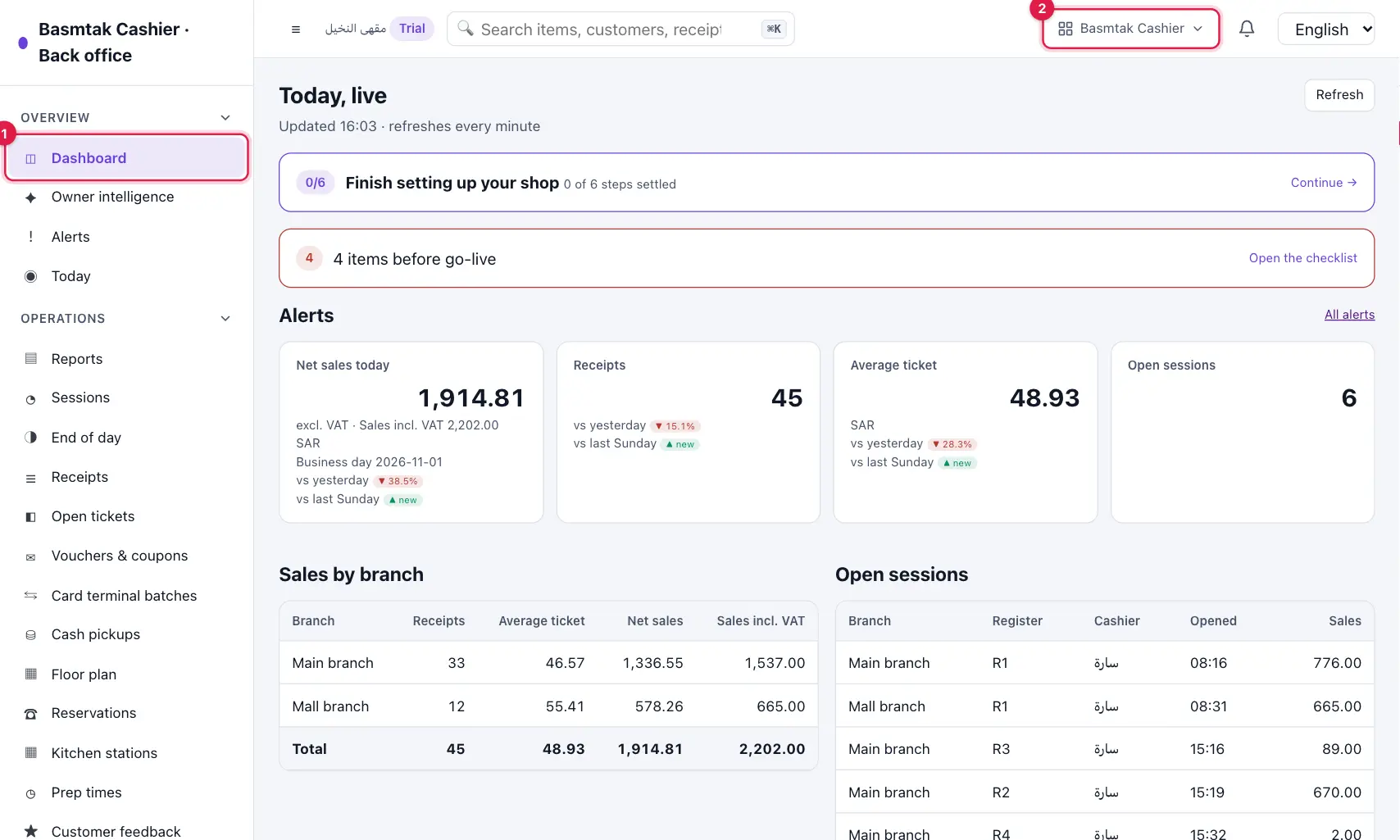
1 The side menu. 2 Moving between Basmtak products. -
3
The till: for whoever sells at the counter
It runs on a device paired to a register. Staff sign in with their PIN, then sell, take payment, and open and close the shift. A shift is one cashier's working period at the drawer, from opening it to counting the cash at close.
1 The selling screen. 2 <b>Back office</b> opens the back office. 3 The pay button. -
4
When does a change reach the till?
While the device is online it checks in about once a minute and takes what is new. To refresh it now, click All synced at the top of the till.জেনে রাখুন: If the internet drops, a till linked from Printers → ZATCA keeps selling with a valid QR and uploads the sales later. The back office always needs the internet.
এই গাইড কি সাহায্য করেছে?