-
1
Open Split
Press Pay under the bill, then choose Split at the end of the side list. -
2
Choose how to split
Under Split evenly pick 2 to 6 parts. Or type an amount under By amount and press Pay.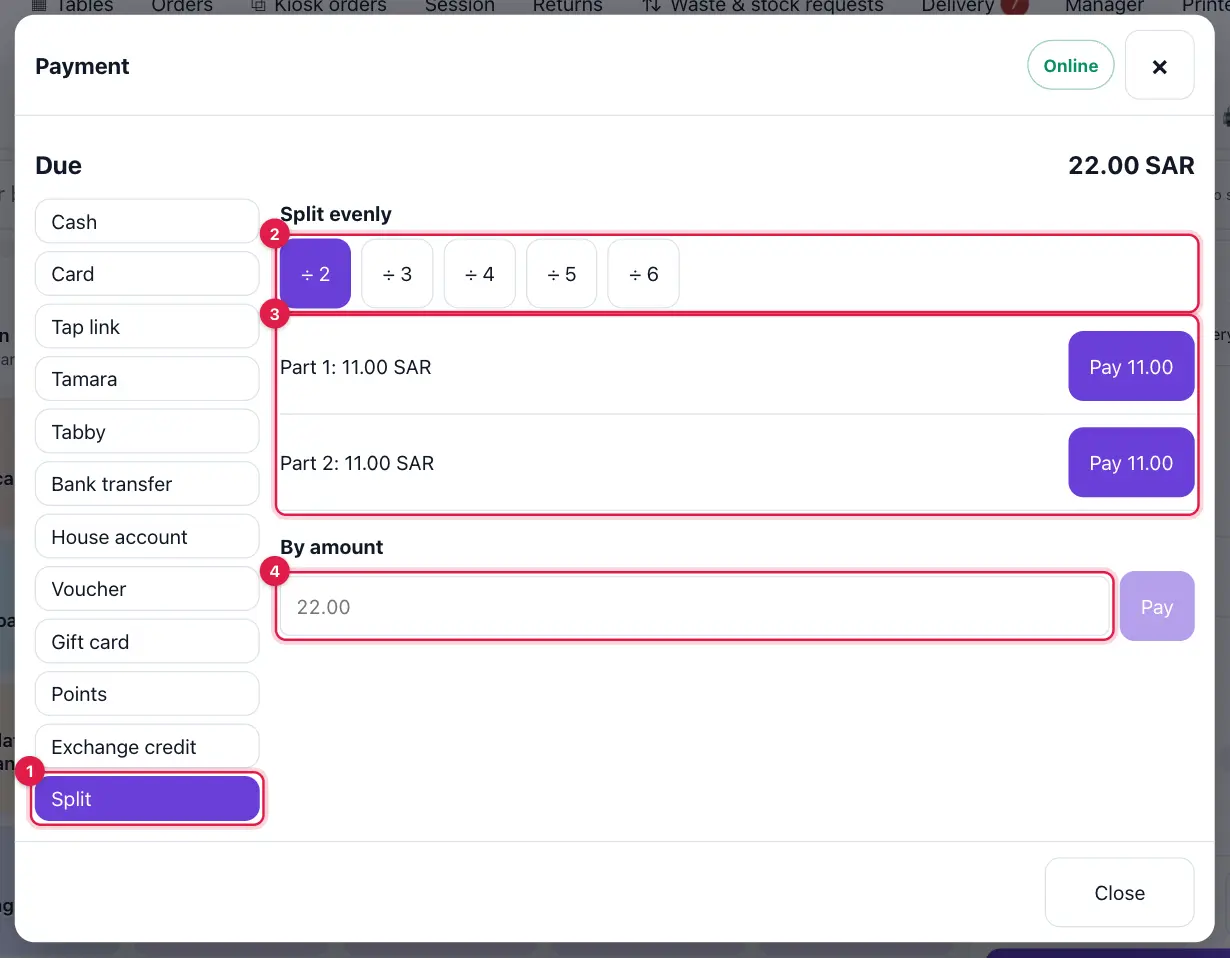
1: the <b>Split</b> tab. 2: the number of parts. 3: the parts and their amounts. 4: an amount of your choice. -
3
Pay the first part
Press Pay beside the part. The screen moves to Cash for that part's amount. If the customer pays by card, choose Card before taking the payment. -
4
Finish the other parts
After each payment Due goes down, the part shows Paid, and the payment is listed under Payments taken. When Due reaches zero the sale completes.
1: the amount due. 2: a paid part. 3: payments taken, with the <b>Undo</b> button. পরামর্শ: Made a mistake on a payment? Press Undo beside it. Once the first part is paid, the number of parts cannot change.
এই গাইড কি সাহায্য করেছে?