The till shows a QR code from your own Tabby account, and the customer splits the amount in the Tabby app. It needs a merchant contract with Tabby. The link is in beta: it has not been run on a real merchant account yet. Available in Saudi Arabia only.
শুরু করার আগে
- A merchant contract with Tabby.
- From it: the secret key, public key and merchant code.
- An internet connection at payment time.
-
1
Enter your Tabby details
Open Compliance → Integrations → Tabby. Enter the Secret key, Public key and Merchant code, then press Save and Test connection.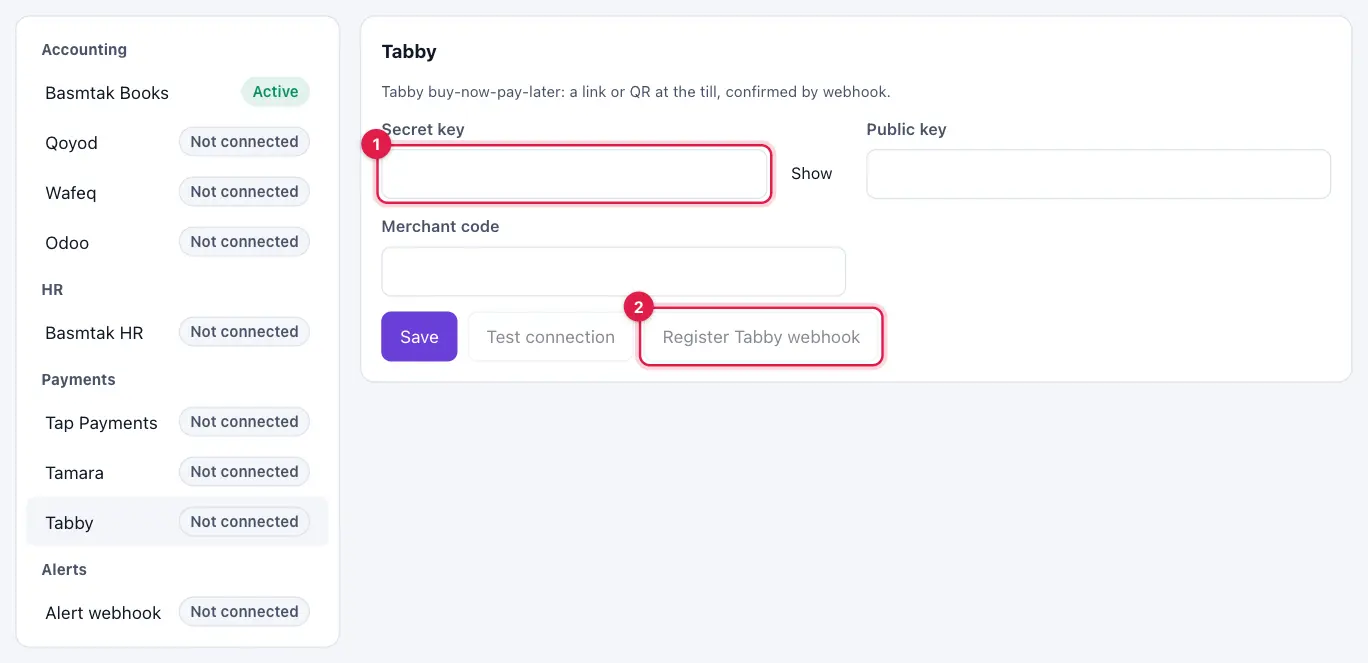
-
2
Register the webhook with Tabby
Press Register Tabby webhook. The address Tabby will call to confirm payments appears. Once is enough. -
3
Take a payment at the till
On the Payment screen choose Tabby, then Pay with Tabby. The customer scans the code and approves on their phone, and Paid with Tabby appears. If Tabby does not approve, choose another way to pay.
সিস্টেমের মধ্যে কী যায়
| কী | দিক | বিস্তারিত |
|---|---|---|
| Payment | ক্যাশিয়ারে | The till confirms it by asking Tabby directly. |
| Accounting | ক্যাশিয়ার থেকে | Booked to <b>BNPL clearing (Tamara / Tabby)</b>. |
সাধারণ প্রশ্ন
The bill changed after the code was shown. What happens?
The new code replaces the earlier one, which can no longer be paid.
How do I give the money back?
With a normal return from the receipt.